
Ņemot vērā masīvu, mums ir jākopē tā elementi citā masīvā, lai naivam lietotājam nāk prātā tālāk norādītais veids, kas tomēr ir nepareizs, kā parādīts tālāk:
// Java Program to Illustrate Wrong Way Of Copying an Array // Input array int a[] = { 1, 8, 3 }; // Creating an array b[] of same size as a[] int b[] = new int[a.length]; // Doesn't copy elements of a[] to b[], only makes // b refer to same location b = a;> Izvade:
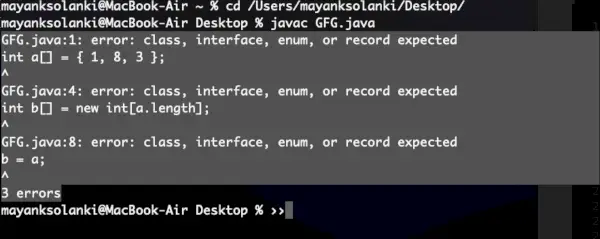
Izvades skaidrojums: Kad mēs izpildām b = a, mēs faktiski piešķiram atsauci uz masīvu. Tādējādi, ja mēs veiktu kādas izmaiņas vienā masīvā, tās tiktu atspoguļotas arī citos masīvos, jo gan a, gan b attiecas uz vienu un to pašu vietu. Mēs varam to pārbaudīt arī ar kodu, kā parādīts tālāk šādi:
Piemērs:
Java
// A Java program to demonstrate that simply> // assigning one array reference is incorrect> public> class> Test {> >public> static> void> main(String[] args)> >{> >int> a[] = {>1>,>8>,>3> };> > >// Create an array b[] of same size as a[]> >int> b[] =>new> int>[a.length];> > >// Doesn't copy elements of a[] to b[],> >// only makes b refer to same location> >b = a;> > >// Change to b[] will also reflect in a[]> >// as 'a' and 'b' refer to same location.> >b[>0>]++;> > >System.out.println(>'Contents of a[] '>);> >for> (>int> i =>0>; i System.out.print(a[i] + ' '); System.out.println('
Contents of b[] '); for (int i = 0; i System.out.print(b[i] + ' '); } }> |
>
>Izvade
Contents of a[] 2 8 3 Contents of b[] 2 8 3>
Metodes:
Mēs esam redzējuši iekšējo darbību, kopējot elementus un malu gadījumus, kas jāņem vērā pēc iepriekš ģenerēto kļūdu novēršanas, tāpēc tagad mēs varam piedāvāt pareizos veidus, kā kopēt masīvu, kā norādīts tālāk:
- Katra dotā oriģinālā masīva elementa atkārtošana un kopēšana pa vienam elementam
- Izmantojot klona() metodi
- Izmantojot metodi arraycopy().
- Izmantojot Arrays klases metodi copyOf().
- Izmantojot Arrays klases metodi copyOfRange().
1. metode: Katra dotā oriģinālā masīva elementa atkārtošana un kopēšana pa vienam elementam. Izmantojot šo metodi, tā garantē, ka jebkādas b modifikācijas nemainīs sākotnējo masīvu a, kā parādīts tālāk esošajā piemērā:
Piemērs:
Java
// Java program to demonstrate copying by> // one by one assigning elements between arrays> > // Main class> public> class> GFG {> > >// Main driver method> >public> static> void> main(String[] args)> >{> >// Input array a[]> >int> a[] = {>1>,>8>,>3> };> > >// Create an array b[] of same size as a[]> >int> b[] =>new> int>[a.length];> > >// Copying elements of a[] to b[]> >for> (>int> i =>0>; i b[i] = a[i]; // Changing b[] to verify that // b[] is different from a[] b[0]++; // Display message only System.out.println('Contents of a[] '); for (int i = 0; i System.out.print(a[i] + ' '); // Display message only System.out.println('
Contents of b[] '); for (int i = 0; i System.out.print(b[i] + ' '); } }> |
>
>Izvade
python programmēšanas piemēri
Contents of a[] 1 8 3 Contents of b[] 2 8 3>
2. metode: Izmantojot Clone() metodi
Iepriekšējā metodē mums bija jāatkārto viss masīvs, lai izveidotu kopiju, vai mēs varam darīt labāk? Jā, mēs varam izmantot klonēšanas metodi Java.
Piemērs:
Java
// Java program to demonstrate Copying of Array> // using clone() method> > // Main class> public> class> GFG {> > >// Main driver method> >public> static> void> main(String[] args)> >{> >// Input array a[]> >int> a[] = {>1>,>8>,>3> };> > >// Copying elements of a[] to b[]> >int> b[] = a.clone();> > >// Changing b[] to verify that> >// b[] is different from a[]> >b[>0>]++;> > >// Display message for better readability> >System.out.println(>'Contents of a[] '>);> > >for> (>int> i =>0>; i System.out.print(a[i] + ' '); // Display message for better readability System.out.println('
Contents of b[] '); for (int i = 0; i System.out.print(b[i] + ' '); } }> |
>
>Izvade
Contents of a[] 1 8 3 Contents of b[] 2 8 3>
3. metode: Izmantojot metodi arraycopy().
Varam arī izmantot System.arraycopy() Metode. Sistēma atrodas java.lang pakotnē. Tās paraksts ir šāds:
public static void arraycopy(Object src, int srcPos, Object dest, int destPos, int length)>
Parametri:
- src apzīmē avota masīvu.
- srcPos ir indekss, no kura sākas kopēšana.
- sākt apzīmē mērķa masīvu
- destPos ir indekss, no kura kopētie elementi tiek ievietoti mērķa masīvā.
- garums ir kopējamā apakšmasīva garums.
Piemērs:
Java
Linux make komanda
// Java program to demonstrate array> // copy using System.arraycopy()> > // Main class> public> class> GFG {> > >// Main driver method> >public> static> void> main(String[] args)> >{> >// Custom input array> >int> a[] = {>1>,>8>,>3> };> > >// Creating an array b[] of same size as a[]> >int> b[] =>new> int>[a.length];> > >// Copying elements of a[] to b[]> >System.arraycopy(a,>0>, b,>0>,>3>);> > >// Changing b[] to verify that> >// b[] is different from a[]> >b[>0>]++;> > >// Display message only> >System.out.println(>'Contents of a[] '>);> > >for> (>int> i =>0>; i System.out.print(a[i] + ' '); // Display message only System.out.println('
Contents of b[] '); for (int i = 0; i System.out.print(b[i] + ' '); } }> |
>
>Izvade
Contents of a[] 1 8 3 Contents of b[] 2 8 3>
4. metode: Izmantojot Arrays klases metodi copyOf().
Ja mēs vēlamies kopēt dažus pirmos masīva elementus vai pilnu masīva kopiju, varat izmantot šo metodi.
Sintakse:
public static int[] copyOf?(int[] original, int newLength)>
Parametri:
- Oriģinālais masīvs
- Kopējamā masīva garums.
Piemērs:
Java
// Java program to demonstrate array> // copy using Arrays.copyOf()> > // Importing Arrays class from utility class> import> java.util.Arrays;> > // Main class> class> GFG {> > >// Main driver method> >public> static> void> main(String[] args)> >{> >// Custom input array> >int> a[] = {>1>,>8>,>3> };> > >// Create an array b[] of same size as a[]> >// Copy elements of a[] to b[]> >int> b[] = Arrays.copyOf(a,>3>);> > >// Change b[] to verify that> >// b[] is different from a[]> >b[>0>]++;> > >System.out.println(>'Contents of a[] '>);> > >// Iterating over array. a[]> >for> (>int> i =>0>; i System.out.print(a[i] + ' '); System.out.println('
Contents of b[] '); // Iterating over array b[] for (int i = 0; i System.out.print(b[i] + ' '); } }> |
>
>Izvade
Contents of a[] 1 8 3 Contents of b[] 2 8 3>
5. metode: Izmantojot Arrays klases metodi copyOfRange().
Šī metode kopē norādītā masīva norādīto diapazonu jaunā masīvā.
public static int[] copyOfRange?(int[] original, int from, int to)>
Parametri:
- Sākotnējais masīvs, no kura ir jākopē diapazons
- Kopējamā diapazona sākotnējais indekss
- Kopējamā diapazona galīgais indekss, ekskluzīvs
Piemērs:
Java
// Java program to demonstrate array> // copy using Arrays.copyOfRange()> > // Importing Arrays class from utility package> import> java.util.Arrays;> > // Main class> class> GFG {> > >// Main driver method> >public> static> void> main(String[] args)> >{> >// Custom input array> >int> a[] = {>1>,>8>,>3>,>5>,>9>,>10> };> > >// Creating an array b[] and> >// copying elements of a[] to b[]> >int> b[] = Arrays.copyOfRange(a,>2>,>6>);> > >// Changing b[] to verify that> >// b[] is different from a[]> > >// Iterating over array a[]> >System.out.println(>'Contents of a[] '>);> >for> (>int> i =>0>; i System.out.print(a[i] + ' '); // Iterating over array b[] System.out.println('
Contents of b[] '); for (int i = 0; i System.out.print(b[i] + ' '); } }> |
>
>Izvade
Contents of a[] 1 8 3 5 9 10 Contents of b[] 3 5 9 10>
Visbeidzot, apspriedīsim pārskats par iepriekš minētajām metodēm:
- Vienkārši piešķirt atsauces ir nepareizi
- Masīvu var kopēt, atkārtojot masīvu, un pa vienam piešķirot elementus.
- Mēs varam izvairīties no iterācijas pār elementiem izmantojot clone() vai System.arraycopy()
- clone() izveido jaunu tāda paša izmēra masīvu, bet System.arraycopy() var izmantot, lai kopētu no avota diapazona uz galamērķa diapazonu.
- System.arraycopy() ir ātrāks nekā clone(), jo izmanto Java Native Interface
- Ja vēlaties kopēt dažus pirmos masīva elementus vai pilnu masīva kopiju, varat izmantot metodi Arrays.copyOf().
- Arrays.copyOfRange() tiek izmantots, lai kopētu noteiktu masīva diapazonu. Ja sākuma indekss nav 0, varat izmantot šo metodi, lai kopētu daļēju masīvu.